ConnectWise PSA integration
Your ConnectWise data, checked by Assurix.
Show prospects your service results on a Trust Portal they can open. Connect ConnectWise PSA with the rest of your tools, and live measures like SLA response refresh every six hours.
Screens show a demo MSP (Downforce Technologies)
What it connects
ConnectWise PSA sits with the rest of your stack.
Assurix syncs ticket data, client information, change history and SLA data from ConnectWise PSA. Your response and resolution SLA figures then show to prospects, with when each was last collected. Your other tools connect the same way. Run ConnectWise RMM or ConnectWise Automate too? Both connect.
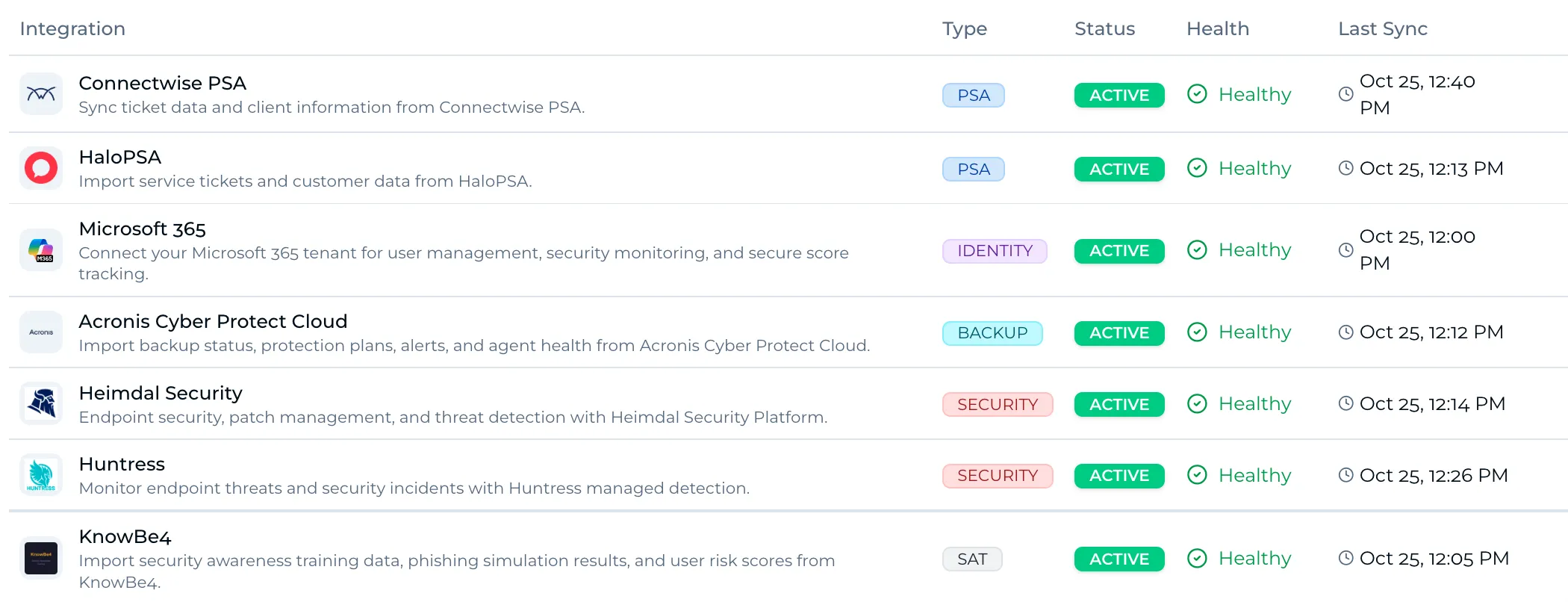
- What Assurix syncs from ConnectWise PSA
Don’t see your tool? We build the connector. Everything Assurix connects to
Why it matters
Your PSA can report anything. Assurix checks it.
Self-reported isn’t proof
Any MSP can export a report from its own tools. A prospect has no way to know it’s true, and you have no way to prove it. Their last MSP made the same promises.
Checked by Assurix
Assurix pulls the evidence itself. Live-measured controls are checked every six hours, and the rest on a set cycle.
Shown to prospects
Prospects see what is checked and whether it passes. You choose how it looks and which documents appear. You can’t change a single result.
 Trust Portal
We’d rather show you than tell you.
Downforce Technologies chose how this page looks and which documents appear here. They cannot change a single result on it.
A demo MSP (Downforce Technologies)
Down to the last two for a 70-user deal, Sereno walked the prospect through its live results and won against a rival holding ISO 27001 and SOC 2. Not the cheapest quote. See Sereno on the Trustmark Directory
From connecting ConnectWise PSA to the Trustmark.
Connect ConnectWise PSA
Authorise ConnectWise PSA in Assurix. Most MSPs are connected within 20 minutes. Your RMM, Microsoft 365 and security tools connect alongside it.
How it worksSee where you stand
Launchpad reads your existing policies and documents, and Rosie maps them to the controls. Your gaps come ranked in plain language.
Earn the Trustmark
Work through your tasks from 2 hours a week, with a weekly check-in. An Assurix assessor signs off. Until then, your link shows you as on the journey to becoming an Assurix Trusted MSP.
Questions from ConnectWise PSA users
Do I need ConnectWise PSA to use Assurix?
No. Assurix connects to the PSA, RMM, Microsoft 365 and security tools you already run. If you use a tool we don’t connect to yet, we build the connector. Anything it can’t pull is assessed evidence, which counts the same.
What does Assurix take from ConnectWise PSA?
Assurix syncs ticket data, client information, change history and SLA data from ConnectWise PSA. Assurix reads from ConnectWise PSA and never writes to it. It uses the data as evidence for the controls it supports, and you can’t edit what it pulls.
Is there a free trial?
No. You can open a live Trust Portal now, with no form, to see what a prospect sees. Book a demo and we’ll show you the platform on the call.
How much does it cost?
We cover pricing on a demo call. One plan, with everything included and unlimited users. Book a demo
How much time does it take?
From 2 hours a week, about 50 hours in total. Work you have done for ISO 27001 or Cyber Essentials is reused where it overlaps.
We’re moving PSA. Should we wait?
Finishing the move first makes sense, and you can agree now to start once it’s done. Billing starts in the month you start. Or run Assurix alongside it. It connects to HaloPSA, ConnectWise PSA and Autotask, so whichever PSA you land on, the new setup is evidenced as it is built.
An MSP that promises, or one independently checked every day?
- Book a demo.30 minutes with Ollie. Mit joins the second call.
- Start in the month you pick.From 2 hours a week, quick wins first.
- Show prospects your live results.Share your link in proposals and at renewal.